If you suddenly get an update notification and Show HyperOS 2.0.13.0.UMOEUXM on your Redmi Note 12 Pro 5G phone . Then it is probably an update to the February 2026 Android security patch. This is not a major feature update – it is a very small OTA, about 28MB. Which is mainly given for maintain system security and stability.
Redmi Note 12 Pro HyperOS 2.0.13.0.UMOEUXM Update
The UMOEUXM at the end of this build generally refers to the EU/EEA (European) firmware track. So according to early reports, the update has start rolling out from the Poland region. Xiaomi usually releases updates in batches, so the same build may go to other European regions later. If your phone is on the same track, there is a possibility of seeing it in a few days. But it is difficult to say exactly when it will arrive.
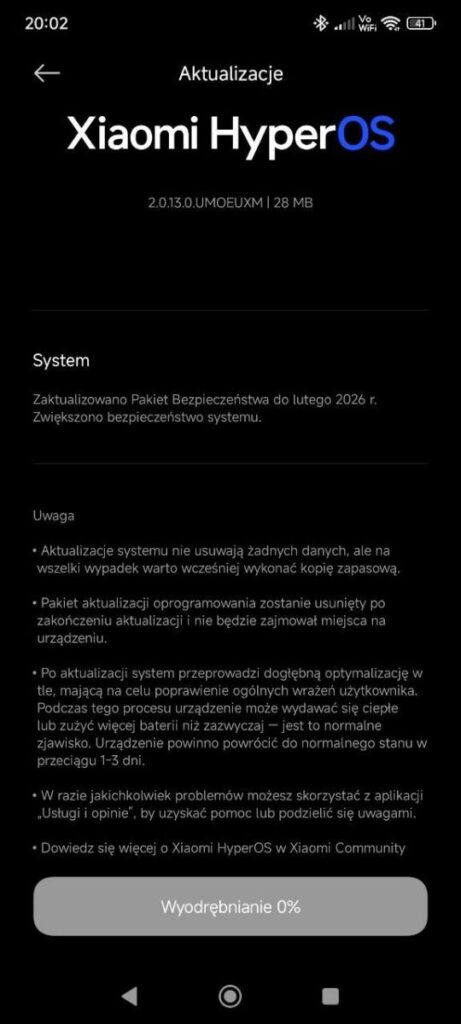
The main tasks of this update are two. One is system security enhancement, meaning fixing new/existing vulnerabilities and tightening overall privacy/security a little. The other is system stability improvement – such as trying to reduce known issues. Such as app crashes, notification delays, abnormal heating or minor lag in some cases. Usually, such security patches do not contain new UI features or major changes. So it is better not to expect “something new”.
We are not talking about data loss here, meaning your personal data is not delete. However, it is safe to backup important photos/contacts/chats before updating. And background optimization may run for 1-3 days after the update. It is not unusual for the phone to get a little hot or the battery to drain a little faster during this time. Most of the time it returns to normal within a few days.
Recomendation of Install
To install the update, use Wi-Fi, keep the battery at 50%+, and restart once after installation. If you feel lag or battery drain is excessive later, observe for a few days. And still doesn’t work, it’s best to report it to Xiaomi Community or your phone’s Feedback/Service app (in some regions, you’ll see “Uslugi i opinie”). If your device has the “wipe cache” option in Recovery, that may also help in some cases. If not, it’s better not to take unnecessary risks.
Also Read: Xiaomi HyperOS 4 Android 17 Eligible Device List: Release Date, Features and more

